NAME
wickwatch
Run several trading bots on several accounts and you soon lose track: which bot runs where, with which settings, and how close is an account to its loss limit? wickwatch shows all of it on one page. It starts and stops bots and, in an emergency, halts a whole account. I wrote wickwatch, use it every day and published the code under AGPL-3.0.
FEATURES
- Overview
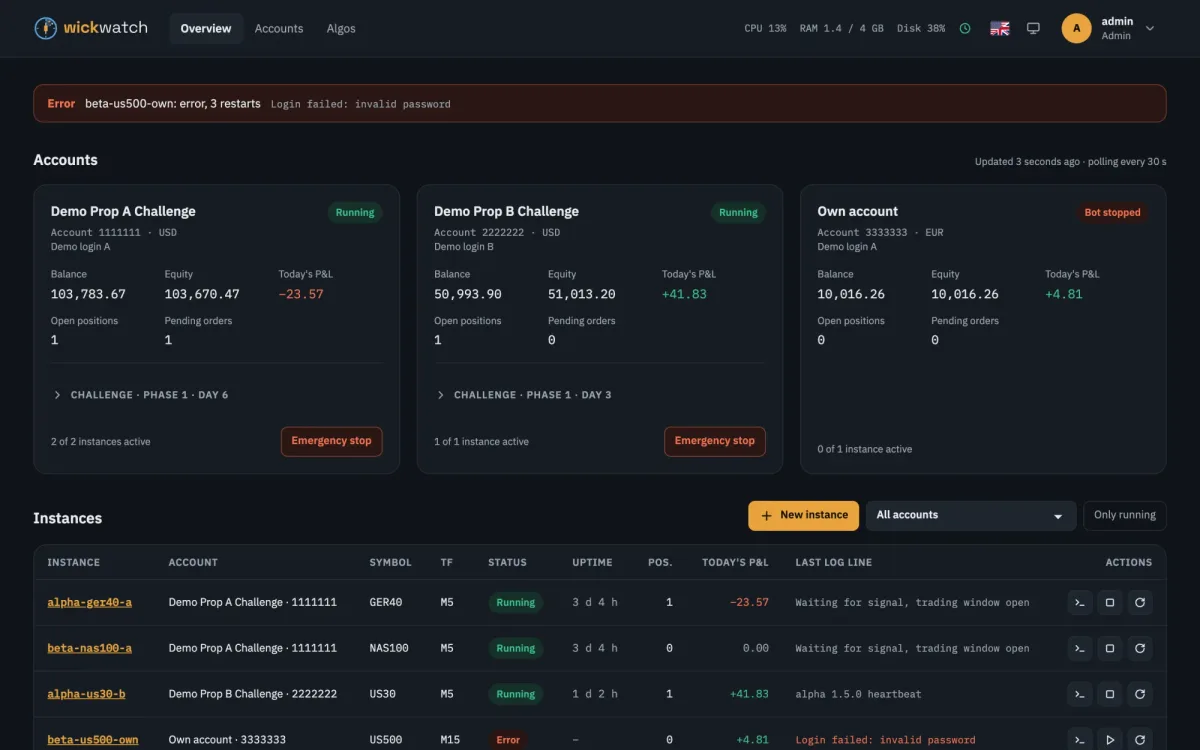
- Accounts with balance, equity and today’s P&L, every bot with status, uptime and last log line. Plus alerts when a bot crashes, loses its connection or an account gets close to a limit.
- Managing bots
- Start, stop, restart, create and duplicate. The parameter form is generated from the bot itself, and every change is a version you can restore.
- Emergency stop
- One click stops all bots of an account, cancels open orders and closes the positions, with a confirmation and an audit log entry. If you like, a loss guard triggers it on its own when a limit is nearly used up.
- Prop challenges
- A profile per account with profit target, daily loss, max drawdown and minimum trading days. Templates for FTMO and The Trading Pit.
- Schedules and log rules
- Pause bots on weekends, holidays or around economic news. When a given line shows up in the log, wickwatch restarts or stops the bot.
- API and MCP
- A REST API with OpenAPI docs and tokens for scripts. Through MCP an AI assistant reads accounts, bots, logs and alerts, and cannot change anything.
- Operations
- Sign-in with two-factor authentication, read-only users, audit log, webhooks and backups. After a server restart wickwatch starts the bots again.
- Interface
- English and German, light and dark, usable on a phone.
EXAMPLE
The overview with demo data. wickwatch ships with a demo adapter of made-up accounts, bots and logs, so you can try it without a broker or real bots, with a single docker run.
DESIGN
- Core and adapters
- The core knows no particular broker and no strategy. Runtime, broker and parameter files plug in through adapters, first for Docker, the cTrader CLI and .cbotset files. Every adapter has a demo version.
- Docker only through a proxy
- wickwatch gets no direct access to Docker. A docker-socket-proxy lets through only the few API calls it needs.
- Credentials encrypted
- Broker logins are stored encrypted in the database. wickwatch gets the key from outside when it starts.
- Live in the browser
- The server runs on Fastify, the interface on Vue. Logs, positions and alerts arrive as server-sent events, without reloading.
- Light to run
- SQLite as the database, one Docker image on ghcr. wickwatch runs on its own or behind Traefik, nginx or any other reverse proxy.
LIMITS
- wickwatch is still in early development. I use it on demo and prop-challenge accounts.
- So far there are adapters for cTrader bots (cBots) only. Other platforms would need their own adapters.
- wickwatch does not trade and says nothing about whether a strategy is any good. It shows what the bots do and stops them when you want it to or a limit is close.
- Whether a prop firm allows automation, certain devices or IP addresses is for you to check.
STACK
typescript · node · fastify · vue · sqlite · docker · agpl-3.0